MUSIC VISUALIZER · LIVE VISUAL ENGINE · WINDOWS
See yourmusic
IKANDY listens to whatever your PC is playing and paints it across every screen you own, live and in HDR. Sold as a music visualizer. Built as an engine: five renderers behind one finish, a director that hears bars and drops, a studio that makes new scenes, and a rig that performs them. This page is running the engine's little cousin right now. Grab a knob.
It really grabs you by the iBALLS.
Built to disappear into the show.
These are current captures from IKANDY itself: the full-screen visualizer, the visual library, and the Stage performance console. No concept art and no simulated interface.
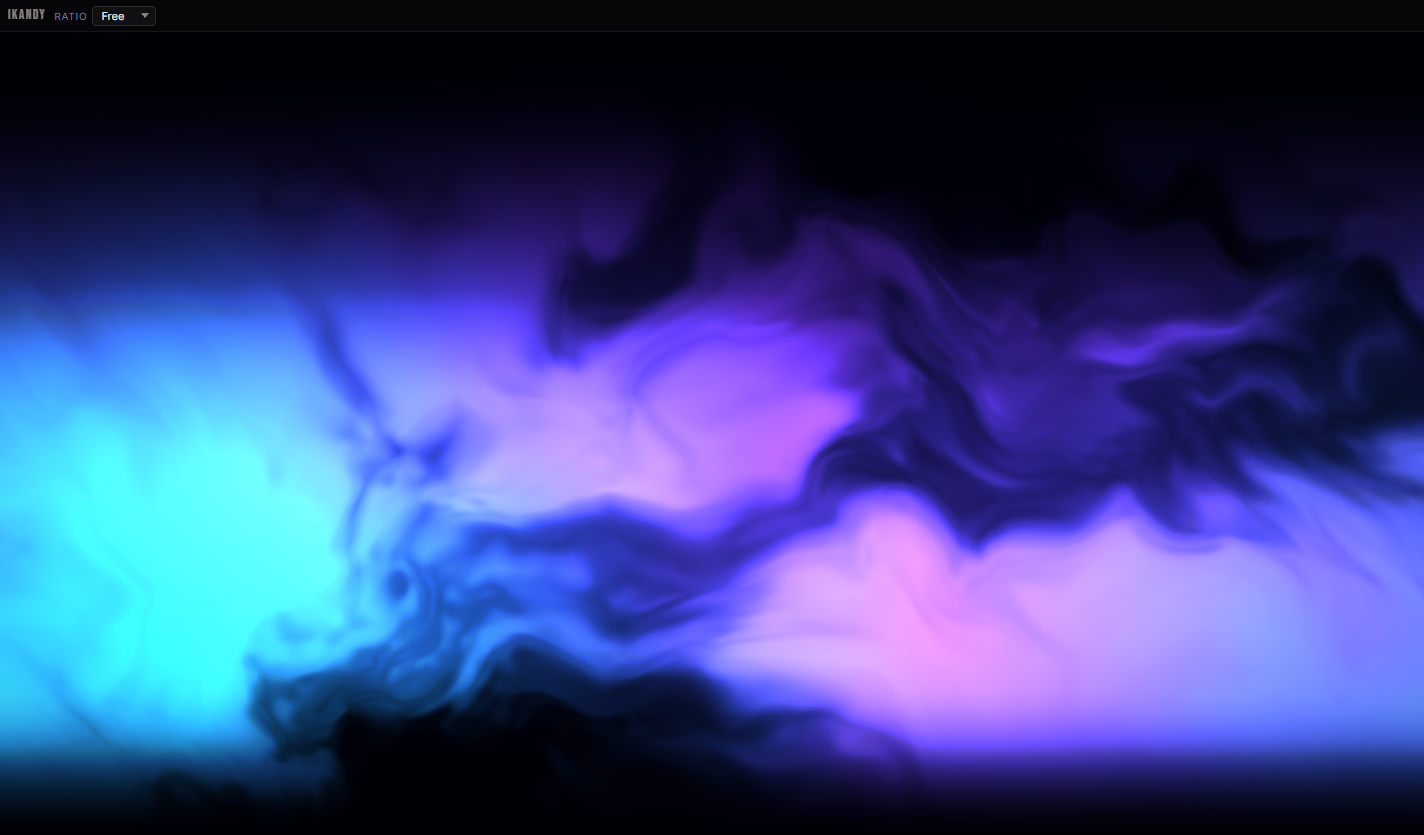
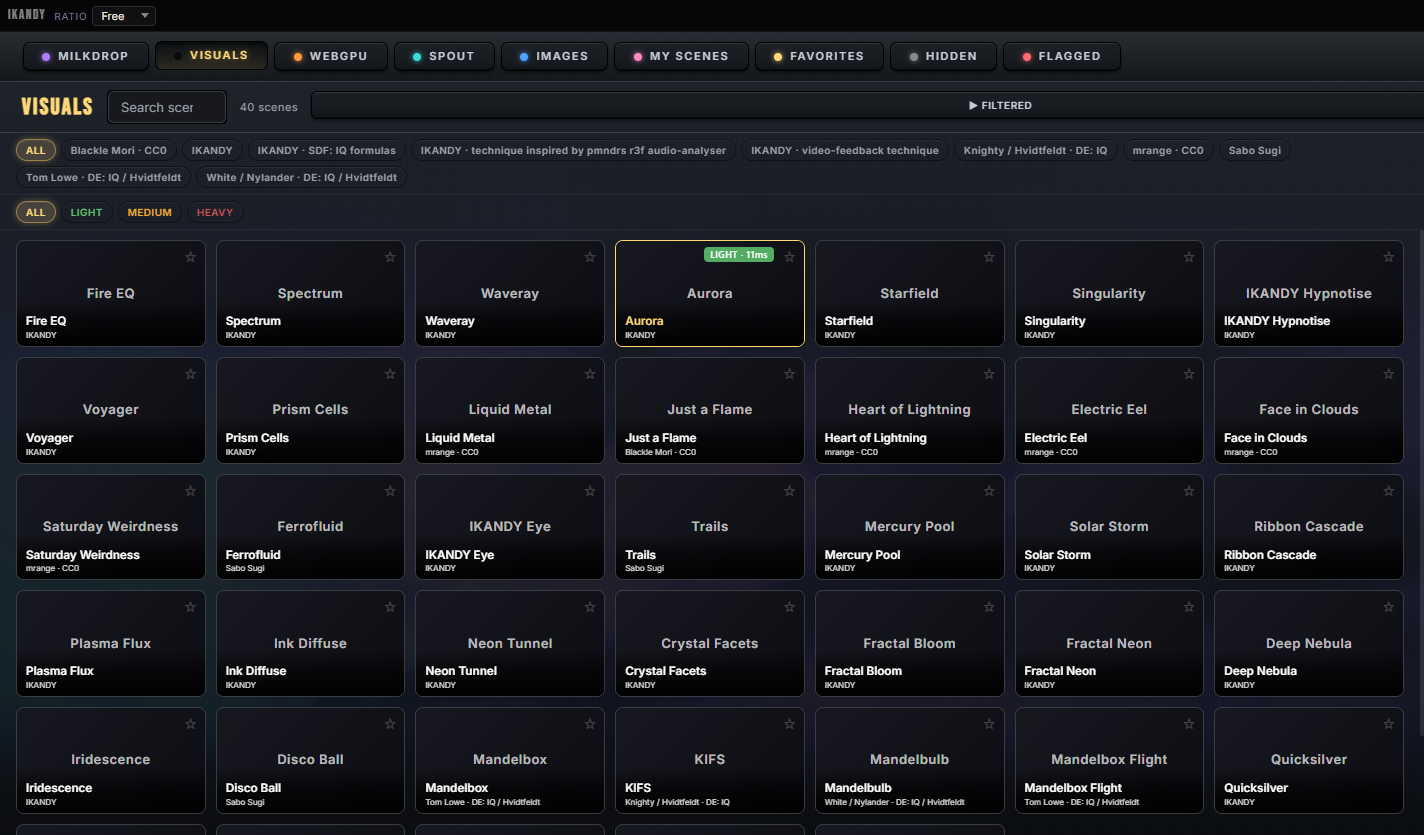
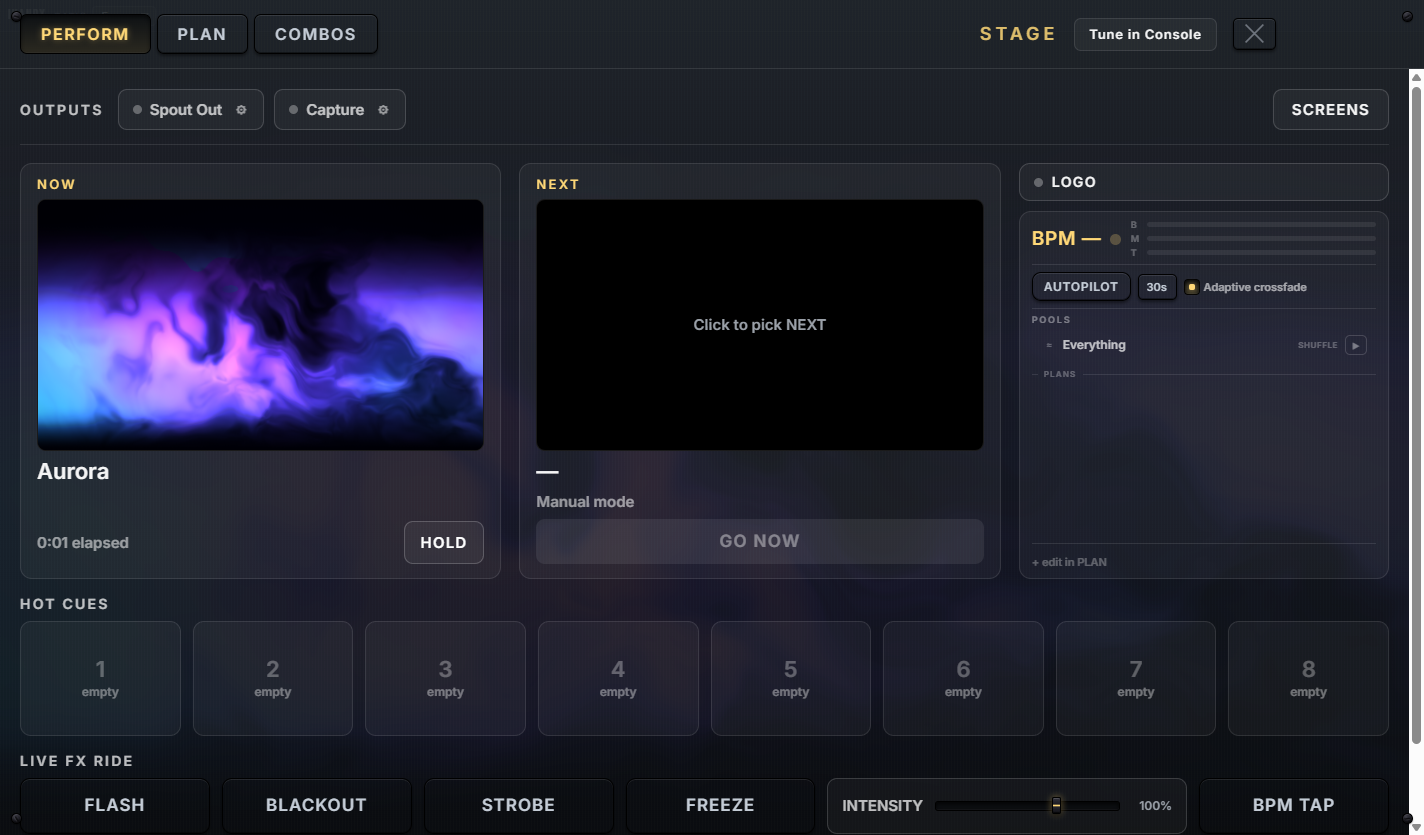
Captured from the July 2026 launch build. The September build has since gained the workspace rail, HDR output and the Create lanes.
Sold as a visualizer. Built as an engine.
Nobody can digest the whole feature list, so here is the shape of it: six things one app does, all on the same audio brain, the same HDR finish and the same library. Everything you can watch is free. Pro opens creation and outputs. Studio opens the performance rig, and Studio is not on Steam yet.
Point it at anything.
Spotify, a browser, a game, foobar2000, MusicBee, VLC or a line-in. Smart Auto follows whichever app is actually making sound, per-app capture ignores your Discord, and PILOT rotates the library on the structure of the track, not a timer. On an HDR display the highlights rise above white.
Make scenes you own.
AI Create writes a new scene from a prompt on your own provider key. Shader Import brings Shadertoy, ISF, GLSL and WGSL work in with knobs attached. Image Studio turns a photo into a living scene, Logo Studio sets your mark in liquid metal or glass, and Steam Workshop carries all of it to other players.
Run the night from one surface.
Stage holds a Now deck and a Next deck, GO with crossfades, hot cues, combos and a Phrase Tape that arranges the show on bars and phrases at the live tempo. MIX blends layers on a crossfader, Ableton Link locks it to the room, and your phone becomes the remote.
Every screen you own.
Span one picture across all your monitors, mirror it, or run it as HDR wallpaper behind your icons. Send Spout or NDI to Resolume and OBS, warp it onto a projector with corner pin and edge masks, record 10 bit HDR video, and save the last 30 seconds with one key.
It is also a place.
One Small Step is a shared moon: everyone hears their own music, the sky is painted by all of it, and other players glow in their own permanent color. Slingshot is a gravity-well ship battle with 25 ships and online lobbies. Five pets dance along the bottom of the show at the tempo of your track.
Five engines, one HDR finish.
MilkDrop on our own WARPCORE engine, GLSL, WGSL, WebGPU compute worlds and Three.js all enter the same post chain: bloom in linear light, god rays that calibrate themselves, a color grade, grain, and a clip governor that meters every frame. On a Display P3 panel the color goes as wide as the panel.
Seven things nothing else in the category does at once.
Every line below describes shipped behavior in the current build. Where a feature belongs to a paid tier, the tier is named. Where that tier is not on Steam yet, that is said too.
- 01
Five engines, one finish.
GLSL, WGSL, WebGPU compute, Three.js and MilkDrop render through one HDR post chain, so god rays, the color grade and temporal AA look the same whether a scene is a shader import, a compute world or a 2001 preset. Every source enters at the same reference white, and a clip governor meters the presented frame so bright scenes glow instead of washing out.
- 02
MilkDrop, on our own engine, in HDR.
WARPCORE is IKANDY's MilkDrop engine: per-pixel warp on the GPU, high dynamic range, over 300 presets plus 100 WarpField visuals built on Ryan Geiss's authored motion, and preset folders proven at 10,000 files. When a classic looks wrong, the engine gets fixed here instead of waiting on someone else's project.
- 03
It hears music as music.
A Musical Director measures tempo, sections and 8, 16 and 32 bar phrases from the raw signal and publishes how confident it is. PILOT changes scenes on that structure, AI Create choreographs a scene over 16 and 32 bars, the Phrase Tape arranges a show on bars at the live tempo, and Ableton Link brings the room's clock in.
- 04
It makes its own content.
AI Create generates scenes on your own provider key inside a contract that carries the motion law and a strobe check. Shader Import takes Shadertoy, ISF, GLSL and WGSL with sealed provenance receipts. Image Studio gives any photo a depth map and a life. Workshop carries all of it between players.
- 05
Safety is engineered, not vibed.
A written Visual Safety Standard governs motion: no periodic whole-field motion in the vestibular band from any driver, beat-locked accents within stated bounds, and Intensity 0 exactly inert, all held by tests. MilkDrop and WarpField presets play as their authors made them, and some flash or move fast; Comfort mode holds them back, and the photosensitivity warning names it along with HDR headroom. Reactivity you can turn all the way down is reactivity you can trust on a stage.
- 06
Every display treated as its own display.
Span across monitors of mixed size and DPI, mirror at full quality, or run HDR wallpaper on one screen and SDR on the next. Each display receives the frame mapped for its own capability. Projection mapping, Spout, NDI, OBS and 10 bit recording all leave from the same finished frame.
- 07
Provenance travels with the art.
Every preset card carries where it came from, its license and what it needs. Shadertoy imports are cryptographically verified, Workshop uploads publish under the name you choose, and an artist's credit stays attached when the work runs on someone else's wall.
One app. Three rooms.
Listeners
Open it on a second monitor, start Spotify, MusicBee, YouTube, foobar2000 or VLC, and walk away. IKANDY cycles through hundreds of scenes on the structure of the track and reacts to your music, not your Discord pings. Everything you can watch is free, in HDR too. Pro adds synced lyrics, a Now Playing card and wallpaper.
DJs & VJs
A node in the rig, not a walled garden. Send Spout or NDI to Resolume, OBS or a media server, or bring a Spout feed or a screen capture in and run it through Capture FX that answer kick, snare and hats. Per-app capture focuses on the booth signal, line-in and interfaces use the same engine, and Stage, MIDI, OSC and Ableton Link are built to be performed. Studio tier, coming to Steam.
Shader artists
Paste a Shadertoy, ISF, GLSL or WGSL fragment and it renders as written, with audio, mouse and date inputs that behave like the original. Declare knobs in a comment and they appear on the console. Hit IGNITE and the engine wires the music in deeper. Your name stays on it in Workshop and on every card.
The sheet.
Tier tags name the tier that unlocks a row. Studio is not on Steam yet.
Buy once. No subscription.
Base
Watch, listen, play.
$0
Pro
Create and stream.
$7.99
Studio
The full VJ rig.
$39.59
Not on Steam yet · 14-day deal at release · $59.99 after
Everything you can watch is free. Every visual, every engine, HDR, PILOT, the moon, the games and the pets are in Base. Pro opens creation, wallpaper, span and mirrors, Workshop publishing and outputs. Studio opens the performance rig, capture and broadcast; it ships inside the app today, locked until the DLC reaches Steam.
No subscription. AI generation is bring-your-own-key: provider charges and availability vary, and IKANDY does not sell separate AI credits.
Nineteen seconds, in motion.
Player not loading? Open on YouTube
The useful answers.
Does it require Spotify?
No. IKANDY can react to system audio, a chosen app, line-in, an audio interface, or a virtual cable. Spotify works like any other media app: IKANDY reads its track info through Windows media controls, with no account connection and nothing to set up.
Will Discord trigger the visuals?
Only if you choose the whole system mix. Per-app capture can listen to one selected music app while ignoring Discord, notification sounds, and everything else.
Is the AI a subscription?
No. AI scene generation is optional and bring-your-own-key. You pay the supported provider directly at its published rates; IKANDY sells no AI credits.
What is the difference between Pro and Studio?
Pro adds creation (AI Create, Shader Import, Image Studio, My Scenes), desktop wallpaper, multi-monitor span and mirrors, the Output Window, OBS and Spout output up to 30 fps at 4K, Steam Workshop publishing, the Milk Deck and the Quick Access Ring. Studio adds the Stage console with the Phrase Tape and MIX, app and game capture with Capture FX, Spout input, Spout at 60 to 120 fps, NDI output, projection mapping, MIDI and OSC, the Preset Lab and the video loop library.
Is Studio available?
Not yet. The Studio DLC is not on Steam as of September 2026. Its features ship inside the app today and unlock when the DLC goes live, with its own 14-day launch offer. Locked workspaces show a live preview behind the upgrade card, so you can see exactly what you would be buying.
Does it do HDR?
Yes, at every tier. On an HDR display IKANDY presents in scRGB with headroom you set from 1.5x to 4x, and a status line in Setup, PICTURE names exactly why a frame is or is not in HDR. Wide gamut output follows displays that report Display P3. Recording can write PQ, HLG or SDR 10 bit video.
Is it just MilkDrop?
No, and the MilkDrop part is not the MilkDrop you remember. Presets run on WARPCORE, IKANDY's own engine, in HDR, next to GLSL and WGSL shaders, WebGPU compute worlds, seven 3D fractal families, Three.js scenes, your own imports and AI-written scenes, all finished by the same post chain.
Does it run on a Mac?
No. IKANDY is a Windows 10 and 11 application, sold on Steam.
Can it run as wallpaper?
Yes. Supported visuals can run behind your Windows desktop icons using the same visual pipeline as the full-screen app.
Does it upload my music?
No. Core playback and audio analysis run locally. Optional metadata, AI, updates, and enabled diagnostics use online services as described in the privacy policy.